_01JMZ4H43P2JR7Z62M1XDT4TBF.png)
Enable Language Translations: Global Reach, Local Trust 🗣️✨
Fomo is designed to be a "chameleon" blending into your site's culture and language perfectly. To get the most out of your international traffic, you need to understand the relationship between your Default Language and your Translation Templates.
🛠️ Step 1: Set Your Foundation (Default Language)
Before you start translating, you must decide what your "Base" language is. This is the language Fomo will show if a visitor’s browser settings don't match any of your specific translations.

👉 First, follow this guide: How to Change Your Fomo Notification Default Language.
The Strategy: * If 90% of your customers speak Spanish, set your Default Language to Spanish.
- If you have a global store and want to serve different languages based on who is visiting, keep your Default as English and add other languages as Translations.
🛍️ Shopify Markets & The "Trigger" Logic
Many modern stores use Shopify Markets, which allows visitors to click a button to switch between Spanish, French, or English versions of the store.
Important Note: Fomo does not react to the language button clicked on your store. Instead, Fomo uses Browser-Level Intelligence.
- The Trigger: Fomo translations are applied based on the visitor's browser language settings.
- The Result: If a user has their browser set to French, Fomo will show the French translation (if you've created it), even if they haven't clicked a language button on your site. This ensures a seamless experience the moment they land on your page. 🎯
🌐 Showcasing Our Global Support
Fomo empowers you to connect with customers in their native tongue across the globe. Besides English, we support 29+ localized languages out of the box:
| Arabic 🇦🇪 | Greek 🇬🇷 | Romanian 🇷🇴 |
| Bulgarian 🇧🇬 | Hebrew 🇮🇱 | Russian 🇷🇺 |
| Catalan 🇪🇸 | Hungarian 🇭🇺 | Serbian 🇷🇸 |
| Chinese 🇨🇳 | Italian 🇮🇹 | Slovak 🇸🇰 |
| Croatian 🇭🇷 | Japanese 🇯🇵 | Slovenian 🇸🇮 |
| Danish 🇩🇰 | Korean 🇰🇷 | Spanish 🇪🇸 |
| Dutch 🇳🇱 | Lithuanian 🇱🇹 | Swedish 🇸🇪 |
| Finnish 🇫🇮 | Norwegian 🇳🇴 | Turkish 🇹🇷 |
| French 🇫🇷 | Polish 🇵🇱 | Ukrainian 🇺🇦 |
| German 🇩🇪 | Portuguese 🇵🇹 |
|
Don't see your language? 🌍
If you don't see your desired language in our current options, we can add it for you! Just reach out and let us know.
Using RTL (Right-to-Left) scripts? ✍️
If you are using Arabic, Hebrew, or other RTL scripts. Make sure to follow the steps from our documentation.
🛤️ Choose Your Path: Default vs. Multilingual
Path A: Your Default Language is NOT English
If you have set your application’s default language to Spanish (or any other language), you do not need the "Translations" tab for that specific language.
-
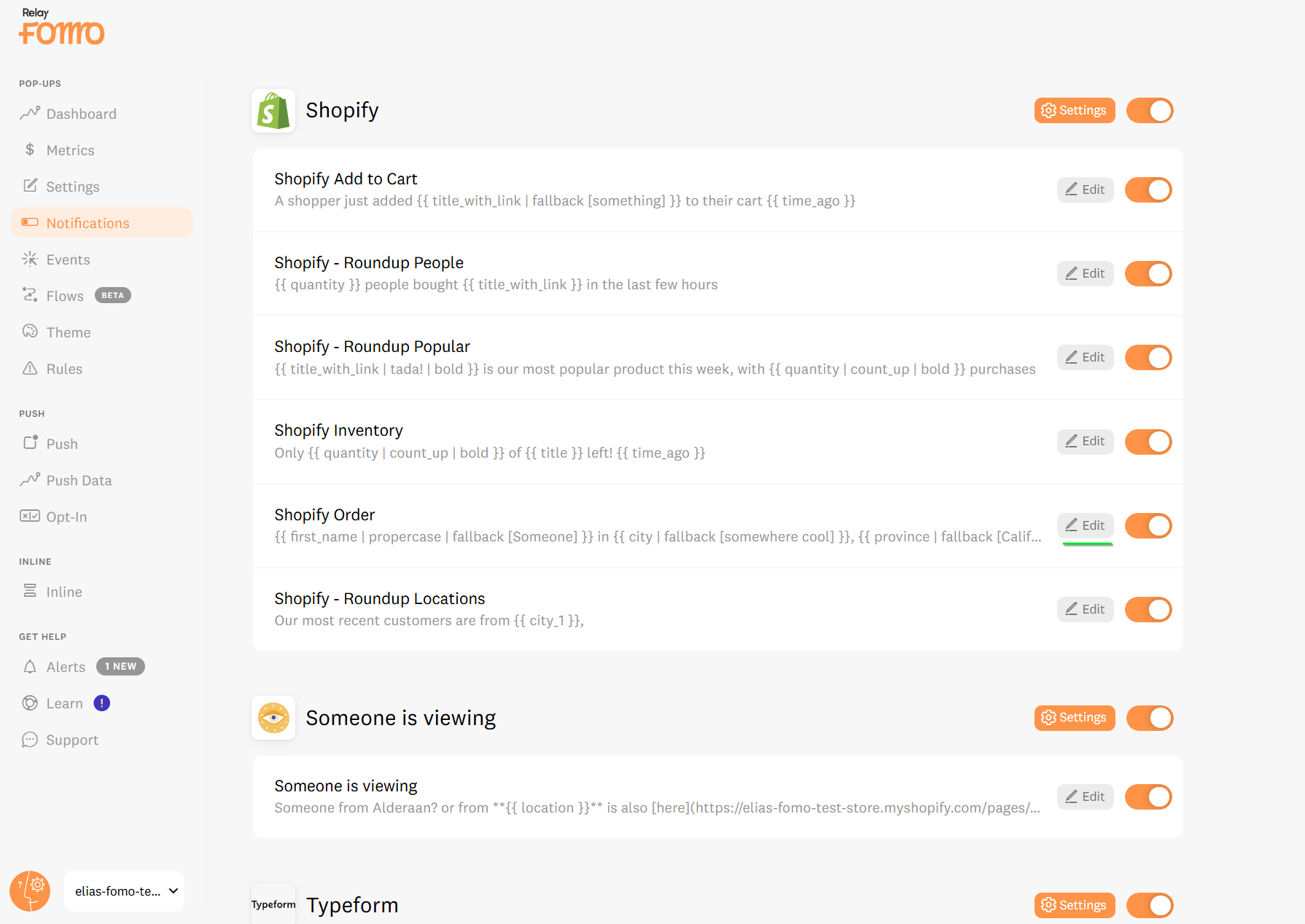
Go to your Notifications tab find the notification you want to translate first and click Edit.
Click on the Notification Message box and proceed to translate.
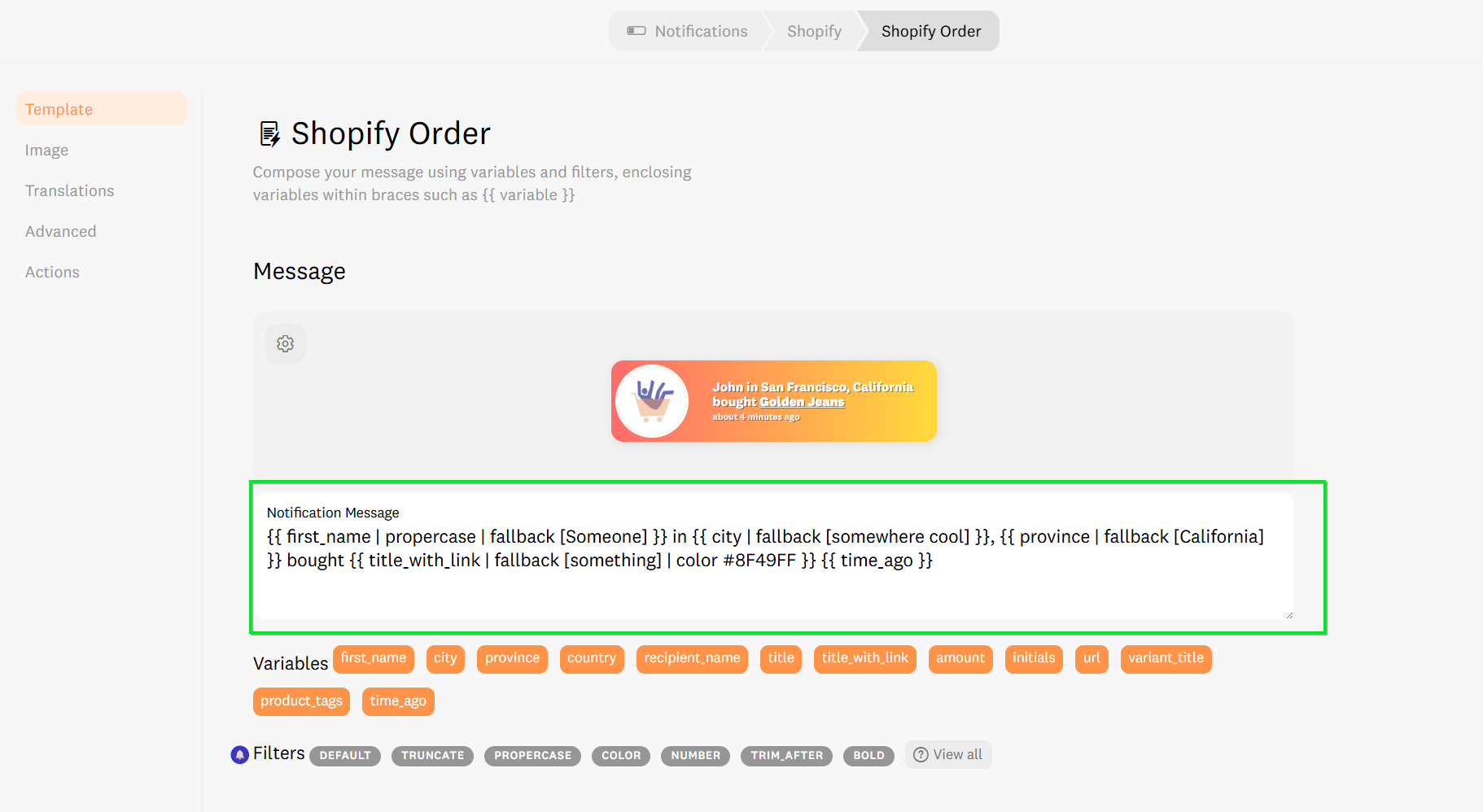
Manually translate the text inside the box.
-
Example: Change "bought" to "compró."
The Variable Rule: Do NOT change anything inside the curly brackets
{{ }}. These are the "brains" of the notification.
-
Correct:
{{ first_name }} en {{ city }} compró {{ title_with_link }}
-
Path B: You Want Multiple Languages (Multilingual)
If your site stays in English by default but you want to show a localized version to visitors in Germany or France:
-
Go to the specific Notification you want to translate in your Notifications tab
-
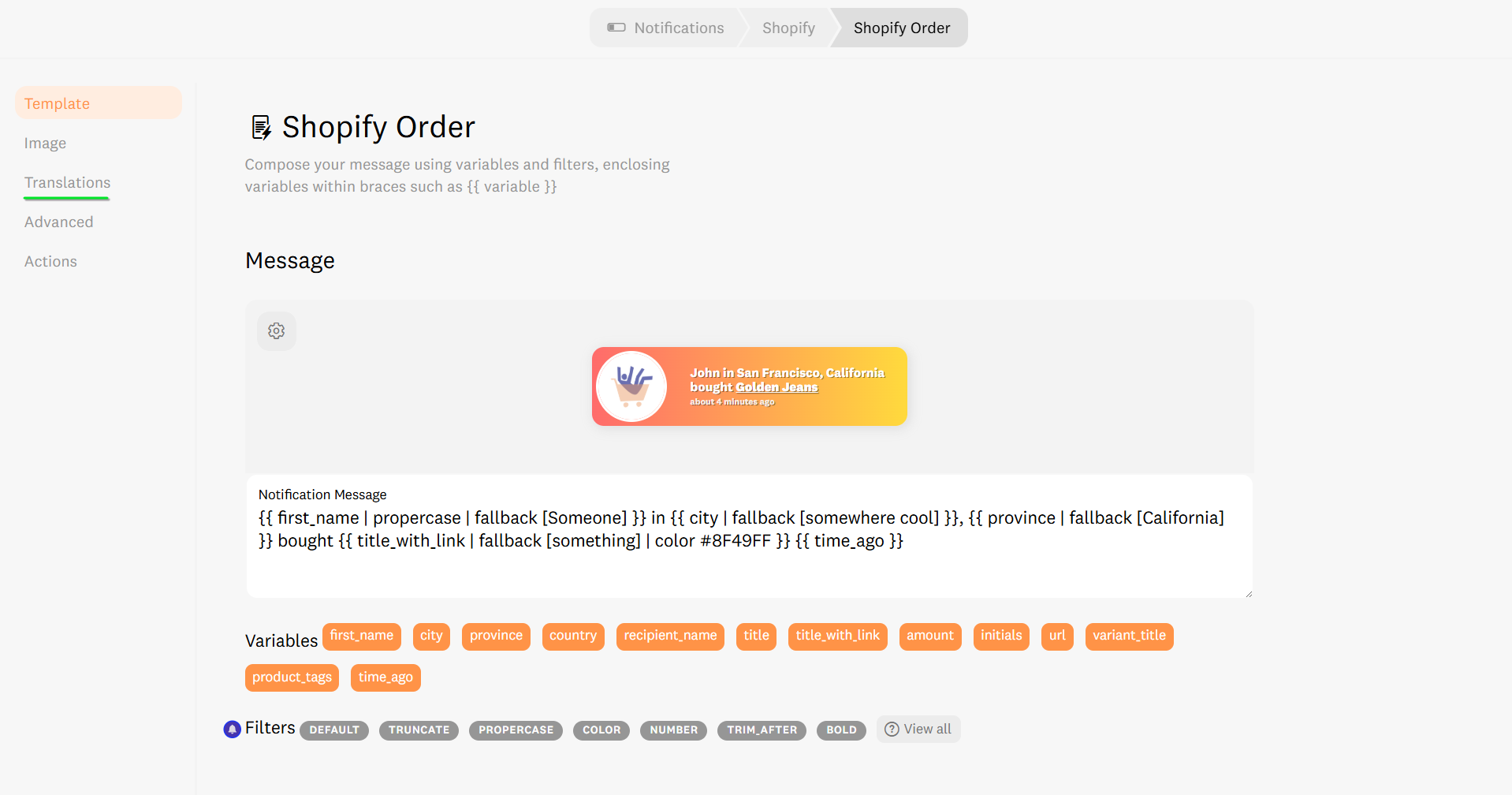
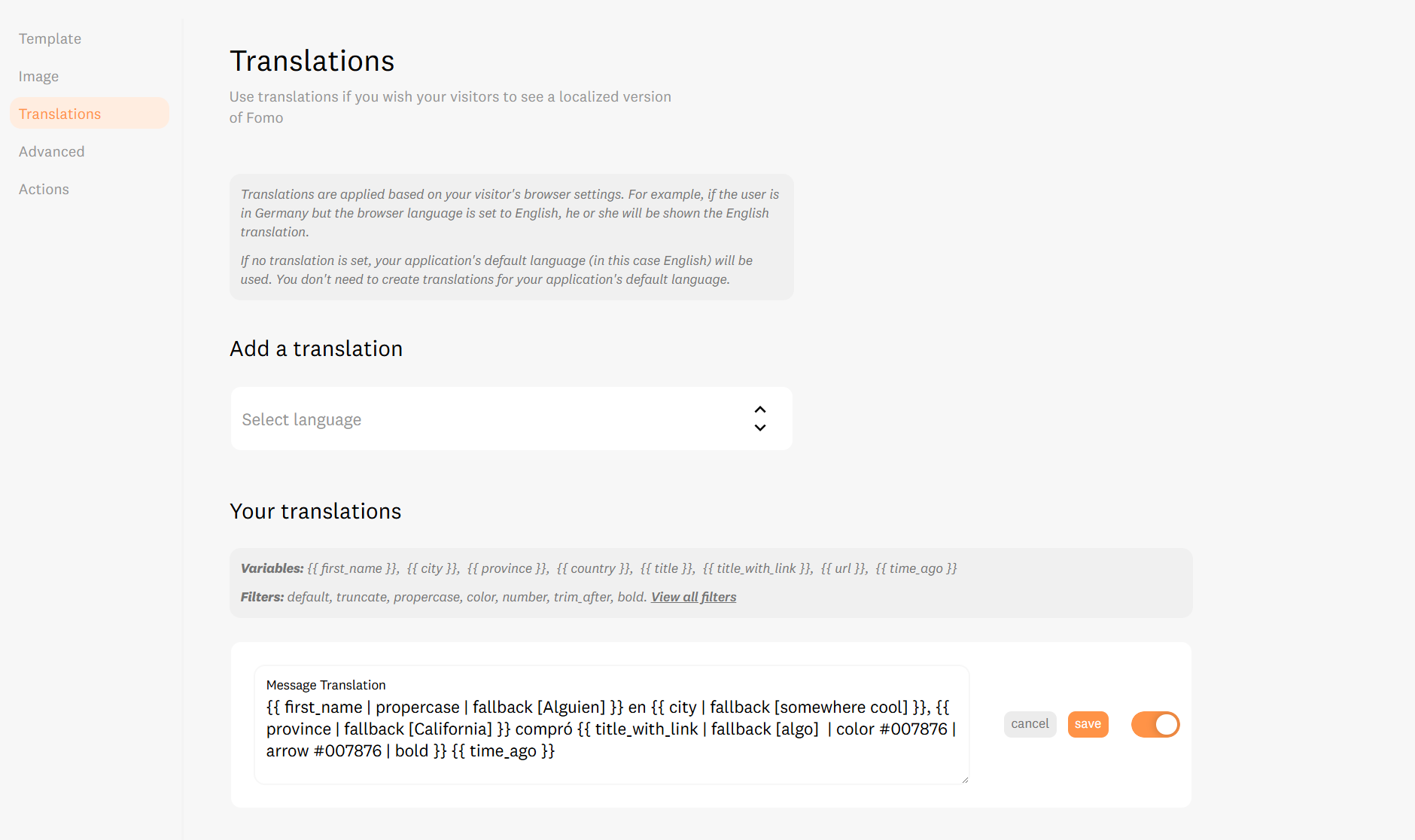
Click Edit Template and find the Translations tab.
-
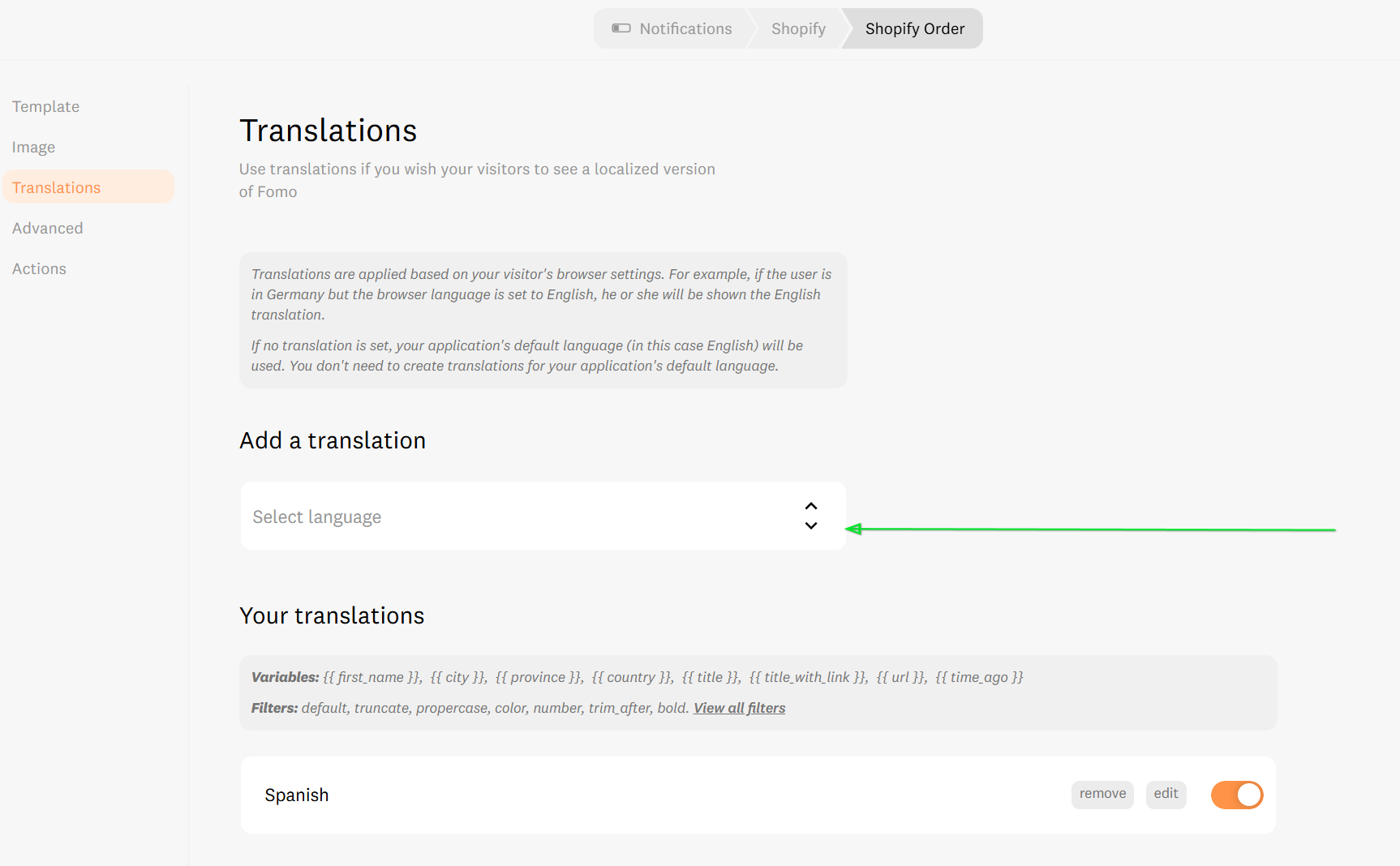
Select the language you want to add (e.g., German).
-
Write your translation in the space provided, leaving the main message box in English.
⚠️ Troubleshooting: "I can't find my language in the list!"
If you are looking for a language in the "Translations" dropdown and it's missing, you likely already set it as your Default Language. Fomo won't let you create a translation for your primary setting. If it's your default, simply edit the main message box directly!
📝 The Technical Bit: Variables & Filters
When writing your translations, you must replace the text outside the brackets.
Everything inside {{ }} will be handled by Fomo.
Please note that names like cities or countries remain in the format provided by the data source (usually English).
Available Variables: {{ first_name }} , {{ city }} , {{ province }} , {{ country }} , {{ title }} , {{ title_with_link }} , {{ url }} , {{ time_ago }} .
🚀 We’re Here to Help You Scale
Every business has a unique "sweet spot" for social proof. If you aren't sure which language strategy will convert best for your specific audience, we've got your back.
Email us: Reach out to hello@fomo.com and our team will jump in.
Work with an Expert: We’ll hop on a call, share screens, and help you build a social proof strategy that fits your brand perfectly. Pick the day and time here.🥳