_01JMZ4H43P2JR7Z62M1XDT4TBF.png)
[For Shopify users] How to upgrade or downgrade your plan
As your store grows, your social proof needs will grow too! Whether you're scaling up for high-traffic seasons or adjusting your monthly budget, changing your Fomo plan is quick and easy.
Because you installed Fomo through the Shopify App Store, your Fomo subscription is handled seamlessly through your regular Shopify invoice. Here is everything you need to know about our plans and how to manage them.
📊 Fomo Plans & Pricing Overview
We offer flexible monthly tiers designed to scale with your traffic.
-
Free Plan (Exclusive to Shopify): 1,000 notifications / month
-
Starter: $25.00 / month – up to 8,000 notifications (limits to 1 website)
-
Business: $75.00 / month – up to 40,000 notifications (unlimited websites)
-
PRO: $149.00 / month – up to 300,000 notifications (unlimited websites)
-
Advanced: $250.00 / month – up to 1,000,000 notifications (unlimited websites)
-
Unlimited: $499.00 / month – Unlimited notifications (unlimited websites)
💡 Looking for the Advanced Plan? Our $250/month Advanced tier is an unlisted high-volume option. While it's hidden from our standard pricing page, it remains fully available for you to select straight from your Shopify-connected dashboard!
🛠️ How to Change Your Plan (Step-by-Step)
If you installed Fomo via the Shopify App Marketplace after March 17, 2021, you are on our standard monthly plans and can manage your subscription directly inside your Fomo dashboard.
-
Log in to your Fomo account go to your Dashboard
-
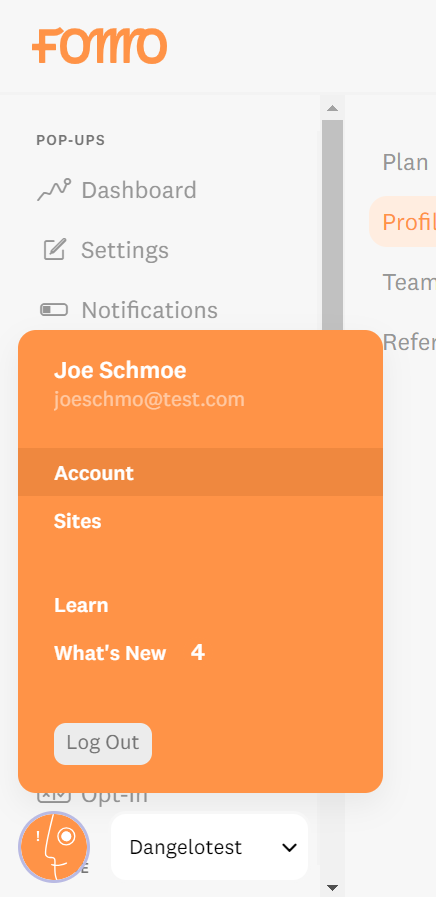
Look to the bottom left corner of your screen and click on the Orance cirle with a face icon to open your profile menu.
-
Click on the Account tab.
-
Scroll down to your billing/subscription section and select the new plan you'd like to switch to.
-
You will be briefly redirected to a Shopify confirmation screen to approve the new recurring app charge. Once approved, your new limits will apply immediately!
💡 How does Shopify handle the billing? When you upgrade or downgrade an app in Shopify, their system automatically prorates your billing cycle. This means you will only pay for exactly what you used on your previous plan, and the updated charge will seamlessly appear on your next Shopify invoice.
🌟 Loving Fomo Enough to Upgrade?
If you're thinking of moving up to a higher tier because Fomo is successfully driving conversions and helping your store grow, we would love to hear about it!
Before you upgrade, would you consider taking 30 seconds to leave us a quick review? Your feedback helps us keep building features you love. You can share your experience by clicking right here
🕰️ Legacy Users (Installed before March 17, 2021)
If you installed Fomo prior to March 17, 2021, you are currently on a legacy, usage-based billing plan rather than a fixed monthly tier. If you wish to update your plan, . (Note for you: just make sure to link the word "here" to the legacy article URL you have in your current Help Scout setup!)
🙋 Need Help?
Not sure which plan matches your store's current traffic? If you're consistently hitting your notification limits or need an extra hand navigating your account settings, we're here for you.
- Email us: Reach out to hello@fomo.com and our team will jump in.
- Work with an Expert: We’ll hop on a call, share screens, and help you build a strategy that fits your brand perfectly. Pick the day and time here.🥳