_01JMZ4H43P2JR7Z62M1XDT4TBF.png)
How to Hide Fomo Notifications When a Drawer Cart is Open 🛒
So, you’ve got Fomo running, the notifications are popping, and the social proof is flowing. Life is good. But then... your customer opens their slide-out drawer cart to checkout, and Fomo is still there, potentially hovering over that beautiful "Checkout" button. 😱
We love being the center of attention, but even we know when to give a shopper some space! When a customer opens a side cart, they’ve moved from "browsing" to "The Decision Zone." To help them cross the finish line without any distractions, we’re going to teach Fomo a neat magic trick: how to vanish the moment the drawer appears. 🪄
By hiding Fomo when the cart is visible, you’re clearing the friction-free path to purchase and ensuring your mobile users have a clear view of their total. Let’s get into the detective work. 🕵️♂️
Wait, what exactly is a Drawer Cart? 🛒🤔
Great question! A drawer cart (sometimes called a "slide-out cart" or "side cart") is that sleek panel that flickers into view from the side of the screen when a shopper adds an item to their bag.
Unlike a traditional cart page which whisks your customer away to a completely new URL (like yoursite.com/cart ) a drawer cart keeps them exactly where they are. While this is great for keeping people shopping, it means the URL never changes. Because Fomo usually lives on your product and collection pages, it doesn't automatically know a cart has just covered the screen.
Hiding Fomo here is all about giving your customer some "Zen Mode" 🧘♂️ while they review their goodies and prepare to hit that checkout button!
Step 1: The Detective Work (Find your CSS Selector) 🔍
Whether you're on Shopify, WooCommerce, Magento, or a custom build, drawer carts work the same way: they don't change the URL, but they do change the code on the page. We just need to find that specific "trigger" class.
-
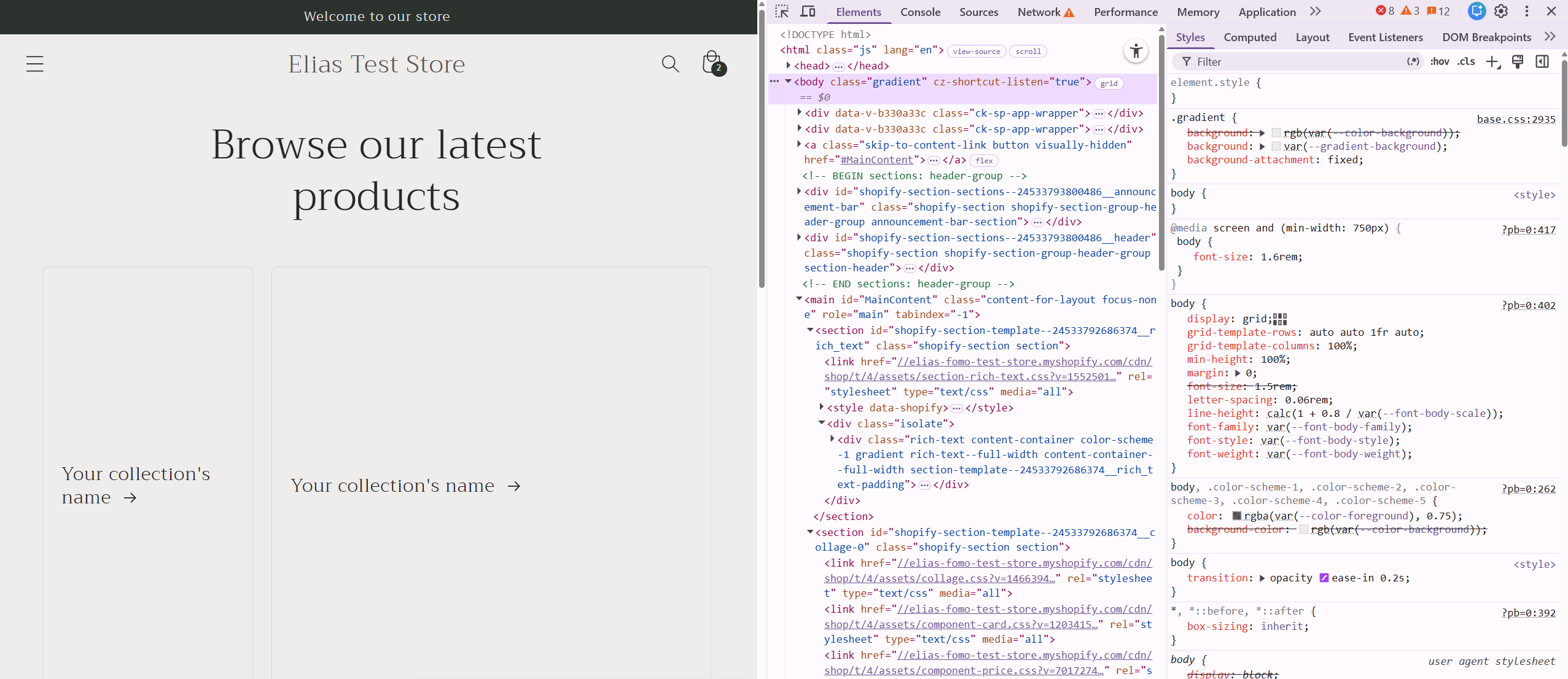
Open your website in a Chrome browser.
-
Right-click anywhere and select Inspect.
-
Now, open your cart drawer on the site.
-
In the "Elements" tab of the inspector, look for a class that "flickers" into existence. Usually, you'll see a change in the
<body>tag or a specific container like<cart-drawer>or<div id="side-cart">.
-
You're looking for words that imply the cart is active, like
.is-active,.drawer--open,.active, or.cart-open.
-
Common Shopify Selector:
cart-drawer.active
- Common WooCommerce Selector:
body.widget_shopping_cart_open
Step 2: Head to the Fomo Lab 🧪
Now that you have your secret code, let’s tell Fomo what to do with it using a Page Rule.
-
Log into your Fomo Dashboard.
-
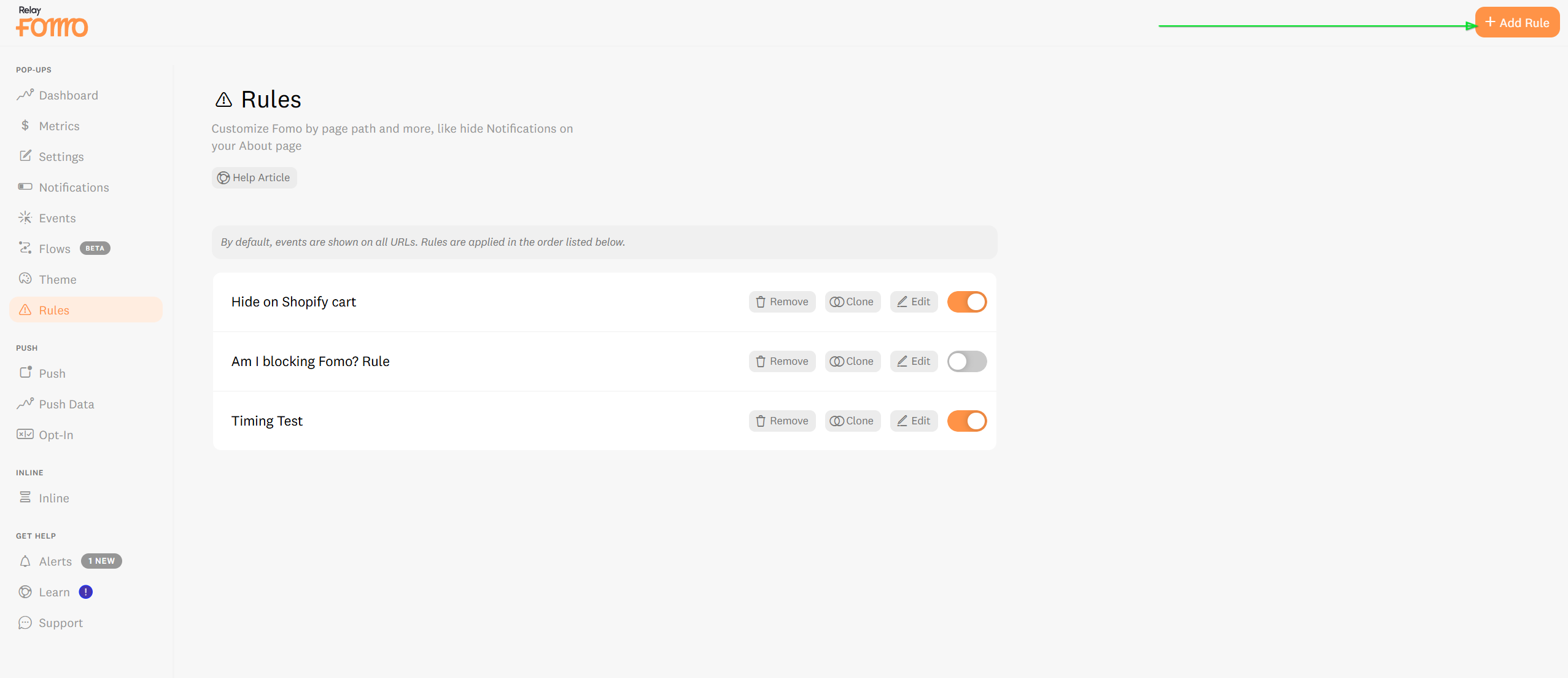
Navigate to > Page Rules Tab.
-
Click that big, beautiful button: + New Rule.
Step 3: Create the "Vanishing Act" Rule 🎩🐇
This is where the magic happens. We’re going to tell Fomo: "If the cart is visible, you shouldn't be."
-
Rule Name: Give it a clear name like "Hide on Drawer Cart Open"
-
Condition: Select "If CSS Selector"
-
Value: Paste the CSS selector you found in Step 1 (e.g.,
cart-drawer.active).
-
Action: Select "Notifications>Hide Fomo."
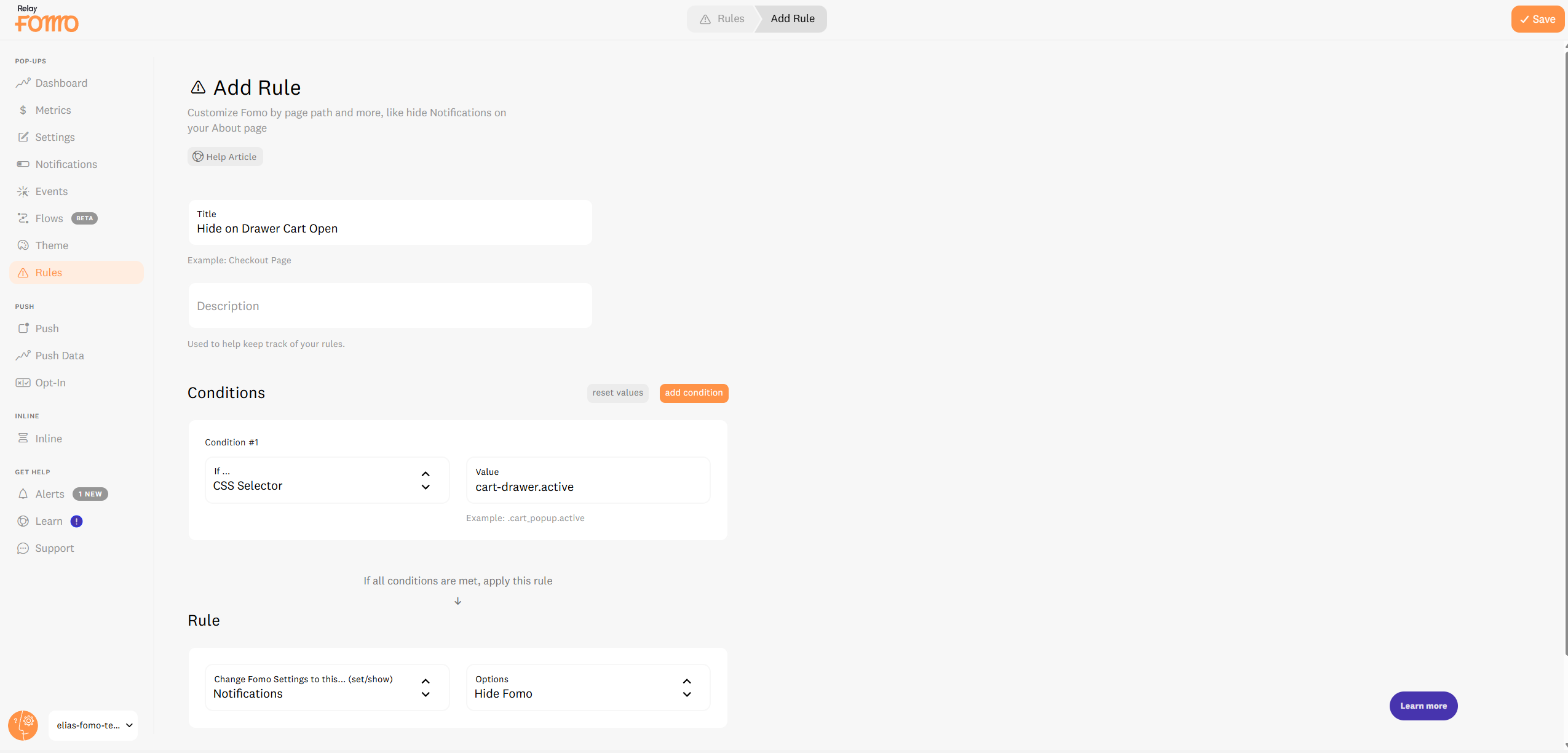
- Save Rule: on the Top Right Corner.
Why this makes you a strategy genius 🧠💸
By setting this up, you are optimizing your store's experience by:
-
Reducing UI Clutter: Keeping the interface clean exactly when the user is reviewing their items.
-
Preventing "Button Block": Ensuring Fomo never accidentally covers the "Checkout" or "PayPal" buttons on smaller mobile screens.
- Respecting Intent: Social proof is for convincing people to buy. Once they’ve opened the cart, they’re already convinced now we just want to get out of the way so they can pay!
🚀 We’re Here to Help You Scale
Every store has a unique "sweet spot" for social proof. If you aren't sure how to find your CSS selector or want to optimize your notification frequency to drive the highest conversions, we've got your back.
-
Email us: Reach out to hello@fomo.com and our team will jump in to help you find your selectors.
- Work with an Expert: We’ll hop on a call, share screens, and help you build a social proof strategy that fits your brand perfectly. Pick the day and time here.🥳